011/3
The guest books with you
On your own domain, in your own design. It works out the price, knows what is free, and lets nobody through on a day you have closed.
booking/
SNDR Bókun
Guests book with you, you confirm from your phone, and payment happens when the guest arrives. Nobody takes a percentage on the way through.
The system is built and running. Everything listed below is live.
read process.booking
On your own domain, in your own design. It works out the price, knows what is free, and lets nobody through on a day you have closed.
With the name, the number of people, the phone number and whatever the guest wrote themselves. Confirm or decline in one tap and the guest hears back.
When the guest turns up, the way you do it today. No payment gateway, no card fees and no refund admin.
read clashes.booking
A double booking costs you the guest, the night and usually the review as well. The system is built so that it cannot happen inside your own system. This is how.
A request holds its place the moment it arrives, not when you confirm it. The next guest sees the room as taken while you are still thinking.
Every business has one queue and its bookings are handled one at a time. The second always sees the first and is refused, even when a millisecond separates them.
When you press Staðfesta the system works the capacity out again. If it is no longer free it stops you and says why, rather than letting you find out when both guests arrive.
You can enter a booking by hand into a full house, because sometimes you know something the system does not. It tells you what you are overriding and records that the decision was yours.
This covers Airbnb and Booking.com too: their calendars are read every fifteen minutes and close those nights with you automatically. One gap remains that no system closes: they read your calendar on their own schedule and set the interval themselves, Airbnb every three hours and Booking.com every two, so a night sold with you can still be taken there before they read it. Keep Instant Book switched off and that gap closes as well.
open the dashboard
This is the screen you use every day. It is designed for a phone in daylight with cold hands, not for a desk.
01today()
Who is arriving, how many, and what they wrote. Built around departures rather than bookings, because that is how you think about the day.
02requests()
Everything waiting for an answer, with the count on the tab so you see it without opening anything. Confirm or decline is one tap.
03calendar()
A whole month at once. You see which days are busy, what is closed and where something is waiting, for when somebody rings asking about the fourteenth.
04history()
What happened, when, and who did it. Whether the guest actually received their confirmation is on the record, so you do not have to remember it six weeks later.
05phone()
You enter it yourself and it counts. Otherwise a tour fills up on the phone while the website carries on selling the same seats.
06feed()
Confirmed bookings appear in your phone calendar next to everything else. Set up once and never touched again.
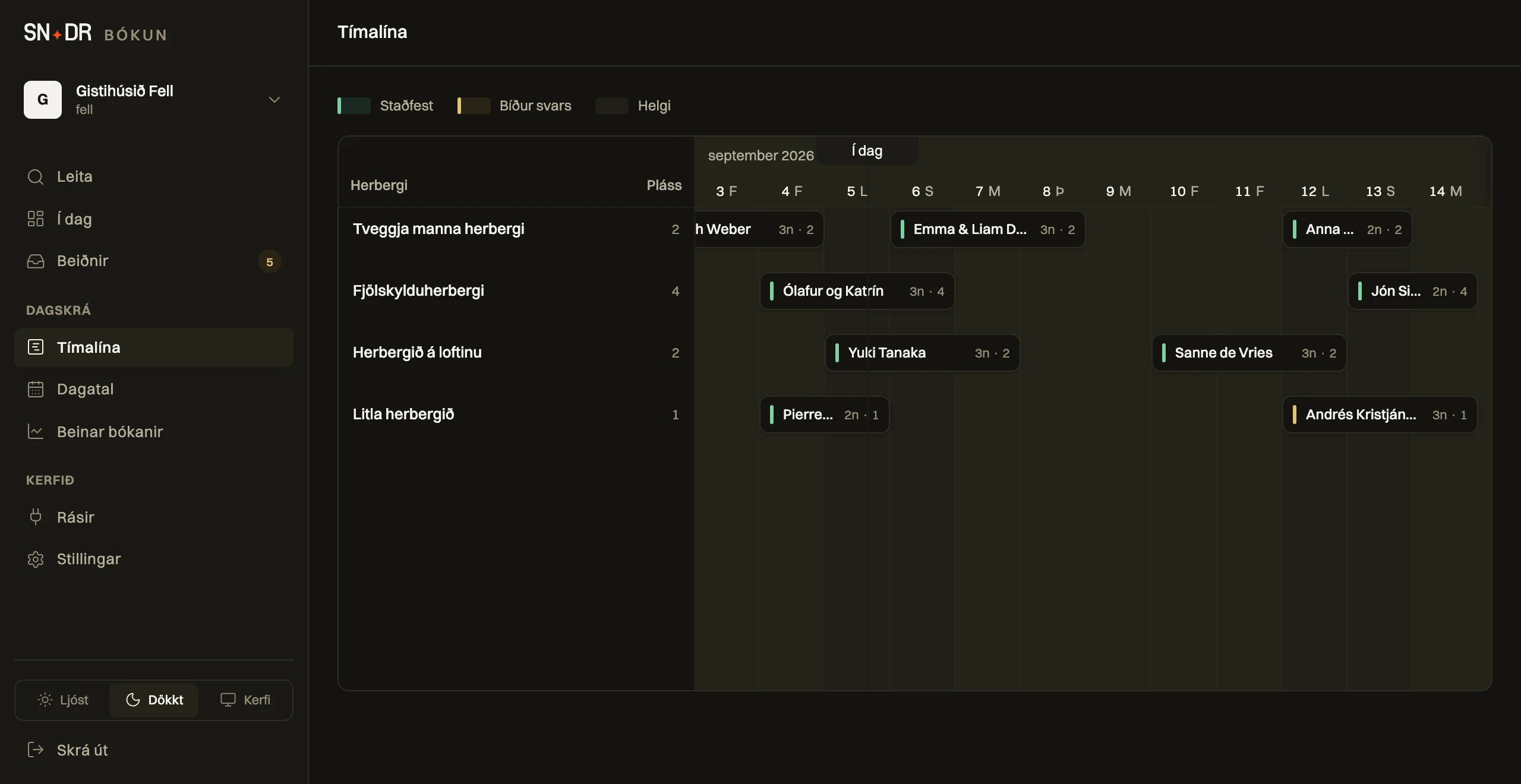
Every room is a row and every booking is a bar spanning its nights. Green is confirmed, amber is waiting for an answer, and the dot marks today. You see the gaps in your month in one second.
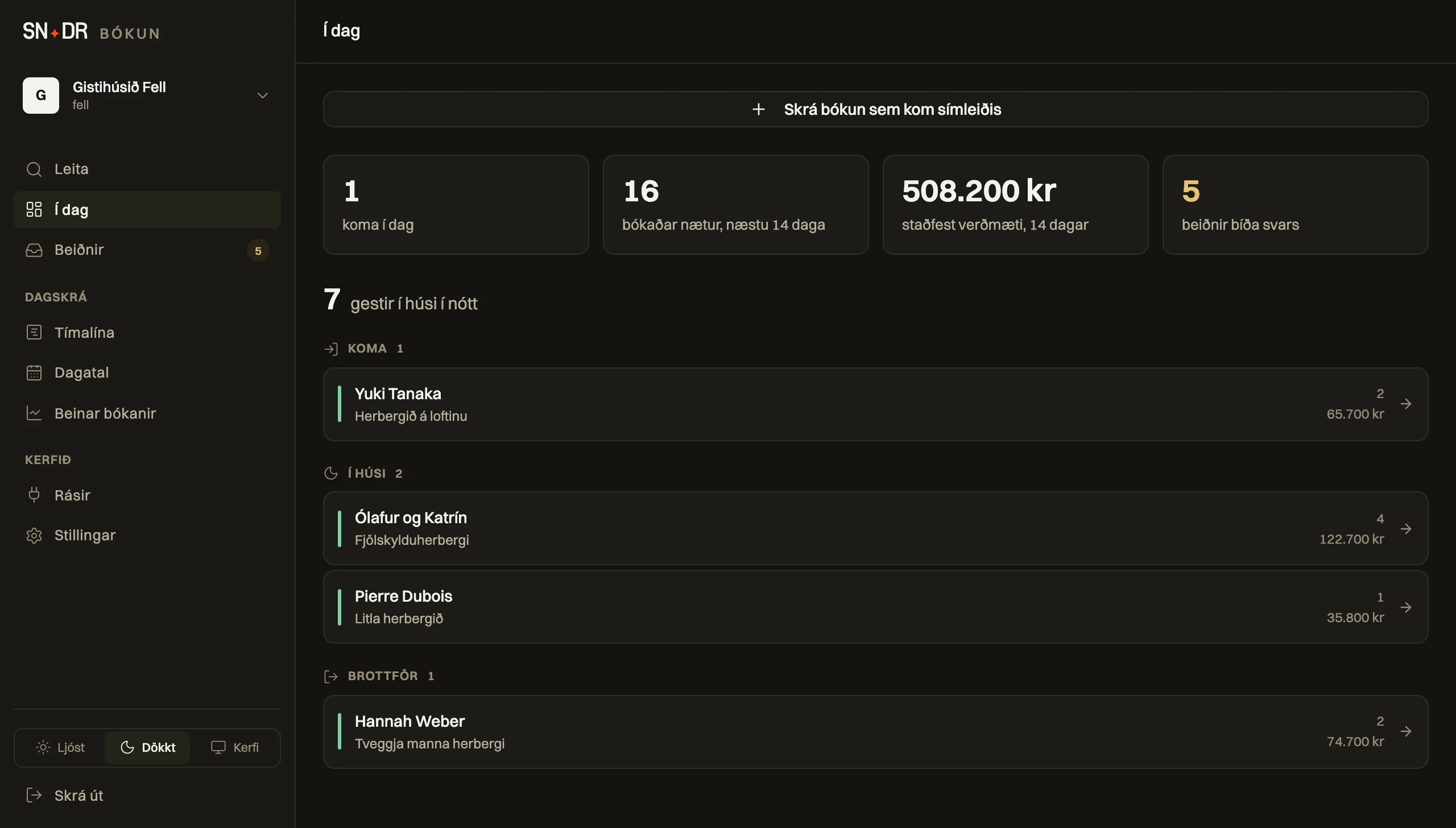
The first thing you see is the numbers: who arrives today, booked nights, confirmed value and what is waiting for an answer. Below it is the day itself in three parts, who is arriving, who is in the house and who is leaving, so you see the morning and the evening at once.
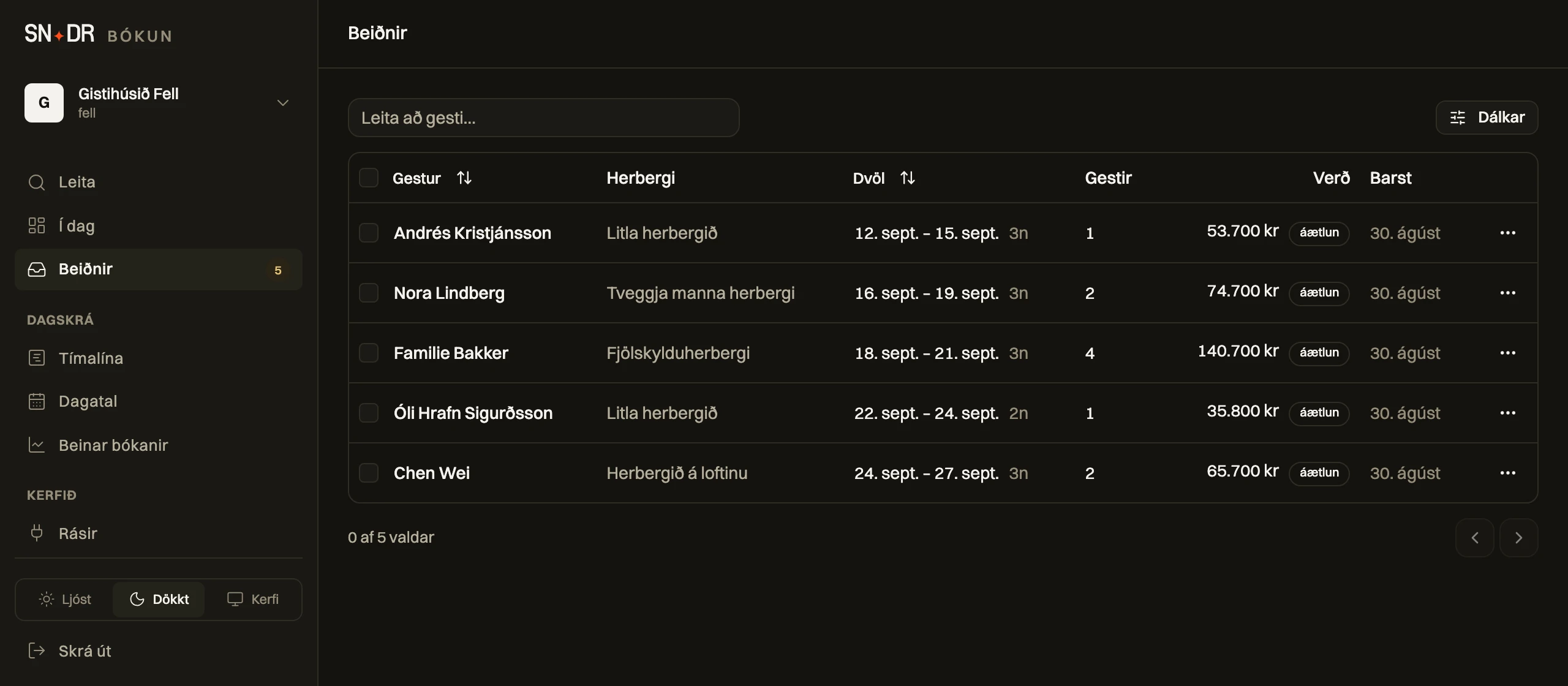
A request never becomes a booking until you press Confirm. The price is worked out, the name and number are right there, and you answer with one tap. The number on the tab tells you what is waiting.
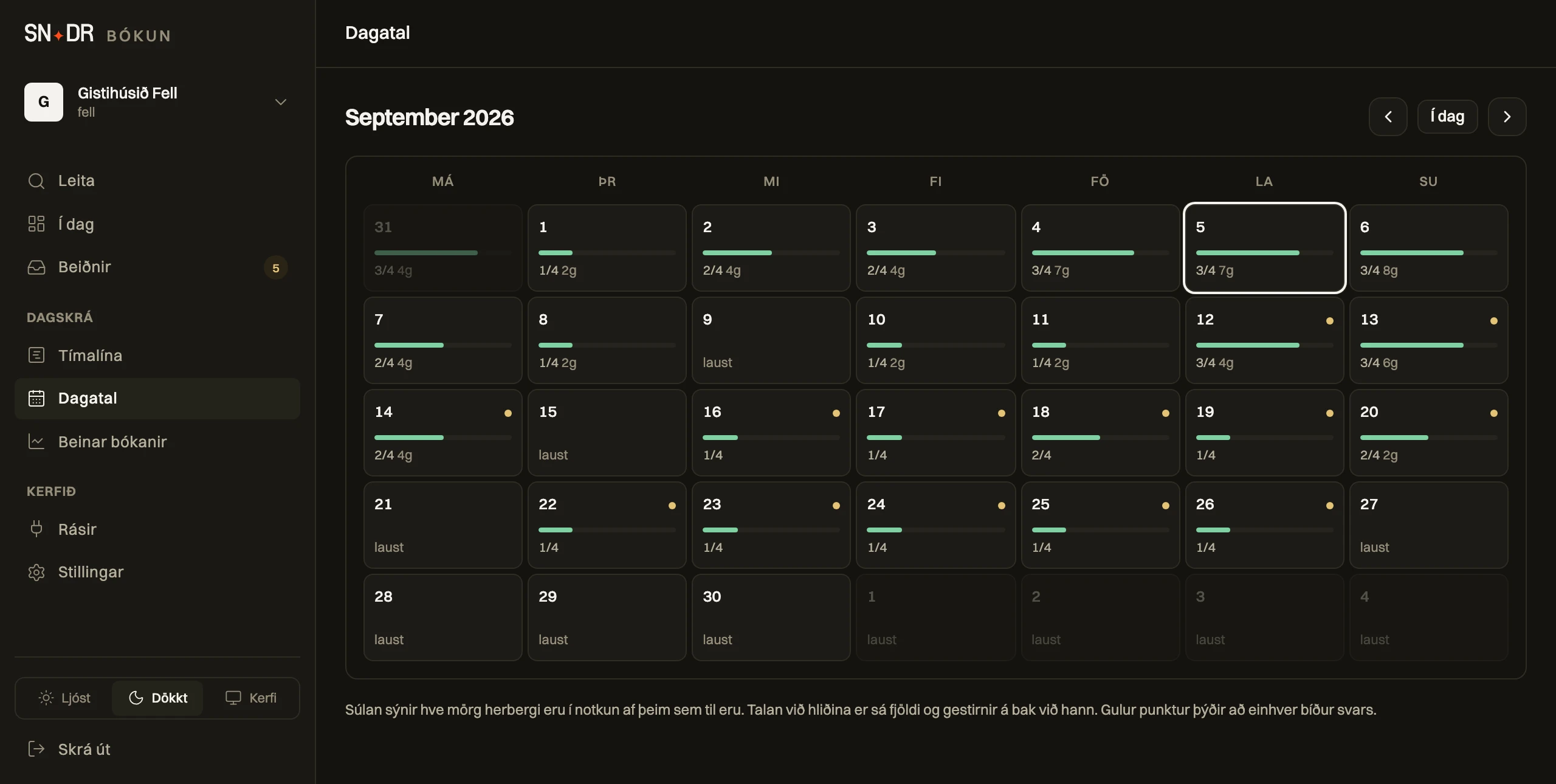
The bar under each day shows how many are booked, the dot means something is waiting for an answer. You close a day with one tap and it can no longer be booked on the site.
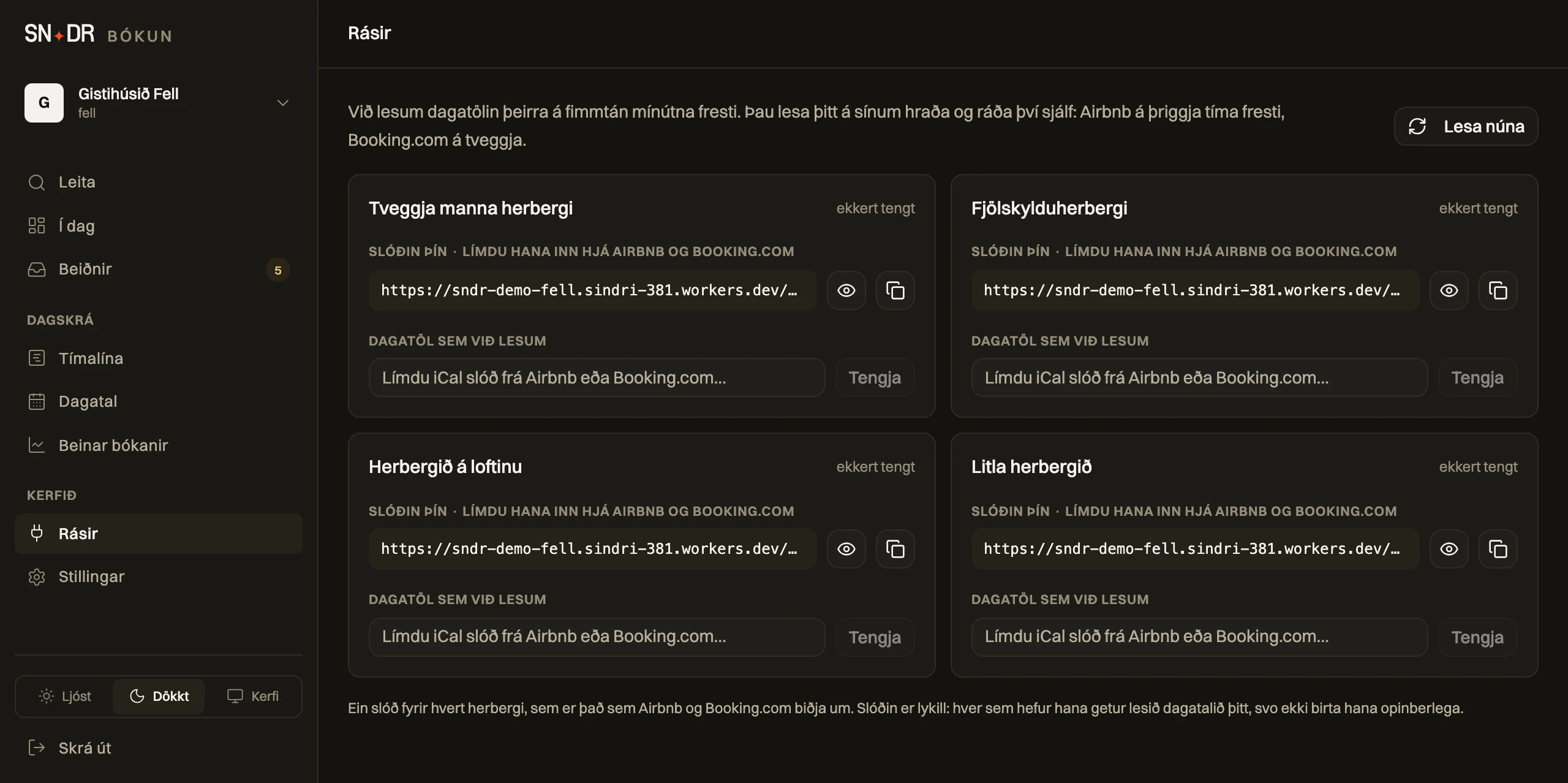
One card per room with both directions on it. You see when we last read their calendar and, the part no other system shows you, when Airbnb last fetched yours. A room turns green when both directions are proven, not when you think you pasted it correctly.
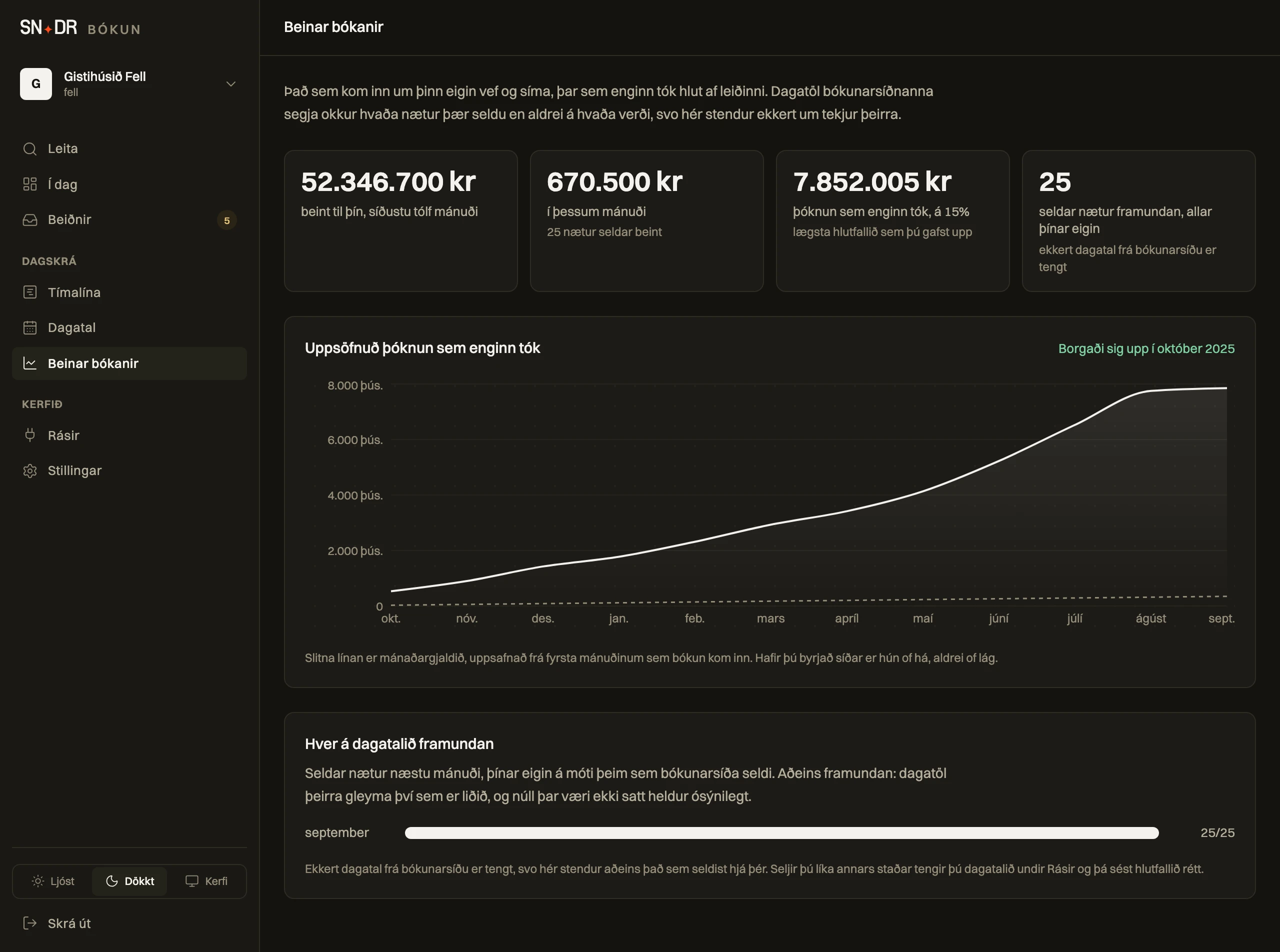
The krónur that came in through your own site and phone, month by month, with my monthly fee accumulating as the dashed line. Where they meet is where the system stopped costing you anything. You enter the rate your booking site charges yourself, because it is in your contract and not mine, and if that field is blank the system works out nothing at all.
The screenshots are taken from the running system, not drawn. Gistihúsið Fell is invented and the guests in it do not exist.
read fee.booking
You pay a fixed monthly fee for the software. Not a share of what you sell.
The reason is simple: the money never passes through an account of mine. The guest pays you directly. I see none of it and have nothing to do with the settlement. I sell software, not access to your revenue.
Bókun’s share is from their own price list and the booking sites’ commission is from their own terms. Check them yourself rather than taking my word for it.
read payments.booking
The guest books, you confirm, and payment happens when they arrive, exactly as it does for you now. For accommodation and tours this is usually what suits best: no payment gateway, no card fees, no refund admin, and no third party sitting on your money for a week.
read connections.booking
Four things, and each of them reads the same information. That is why none of them can say something different from the others.
The booking form sits on your own domain. The guest never goes to another site and never sees anyone else's brand.
What you type into the content system is what the form prices against. Change a price in one place and both the website and the booking follow.
The request lands with you, you confirm or decline, and the guest gets an answer. Nothing happens without you and nothing is paid online.
A confirmed booking appears in your Google or Apple calendar next to everything else you are doing that day.
The AI answer, if you have it, reads exactly the same calendar and the same price list. That is why it cannot promise a night that is already sold.
read integrations.booking
A booking system is not an island. Here is everything it talks to today.
A confirmed booking shows up in your calendar next to everything else.
The same link, set up once on your phone and then never touched again.
The link is ordinary iCal, so any calendar that reads it works.
Confirmations go out from your own domain, not from some sndr address.
The booking form sits on your domain. The guest never goes anywhere else.
Answers on free nights and prices by reading the same calendar you see.
A booking taken by phone you enter yourself, and it closes the day like any other.
Their calendars read every fifteen minutes, yours sent back per room, and you can see when they fetched it.
Using something that is not on the list? Ask. The system is my own, so a connection is a build job rather than a licence somebody else has to approve. I tell you what it costs and how long it takes before you decide anything.
read status.booking
Every single line here runs today. You should be able to check all of them before you sign anything.
tilbúið
The import from Airbnb and Booking.com is built and runs every fifteen minutes. One gap remains and it is not mine to close: Airbnb re-reads your calendar every three hours and sets that interval itself, so a night sold with you can still be taken there inside that window. That is why I recommend keeping Instant Book switched off on Airbnb. I would rather tell you now than when a double booking happens.
open a conversation
I will set up a sample with your own tours or rooms and you try booking on your own phone. It costs nothing and commits you to nothing.